

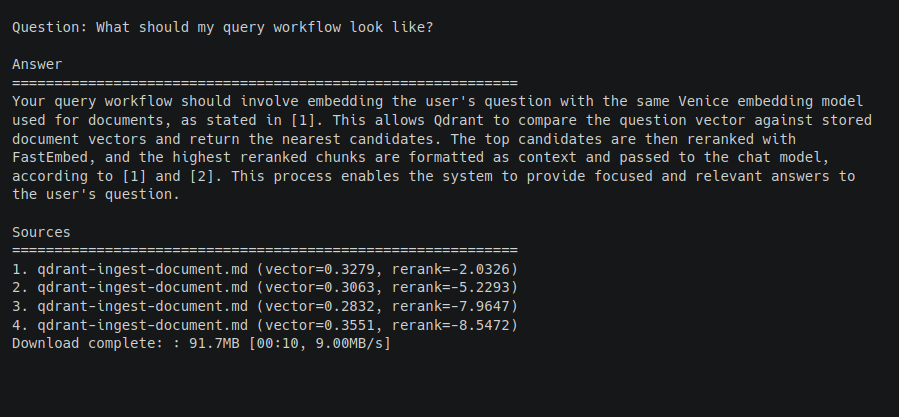
How a Modern RAG Bot Works
A good RAG pipeline is more than “put documents in a vector database.” The basic flow looks like this:| Step | What happens |
|---|---|
| Load | Read local Markdown, text, or reStructuredText files |
| Chunk | Split long documents into overlapping sections |
| Embed | Use Venice embeddings to turn chunks into vectors |
| Store | Save vectors and source metadata in Qdrant |
| Retrieve | Embed the user’s question and run vector search |
| Re-rank | Use a cross-encoder to rescore the best candidates |
| Answer | Send the best context to a Venice chat model with citation instructions |
Installing the Dependencies
We’ll use the OpenAI Python SDK because Venice exposes an OpenAI-compatible API. We’ll also use Qdrant’s Python client with FastEmbed support:requirements.txt with the same packages:
Choosing the Models
Create a file calledrag_bot.py, then start by adding the imports, data structures, API URL, and model names:
base_url and API key.
You can list available Venice models with:
Creating the Venice and Qdrant Clients
Create one OpenAI-compatible Venice client for both embeddings and chat completions:| Mode | When to use it |
|---|---|
QdrantClient(":memory:") | Quick local demos and tests |
QdrantClient(path="./qdrant_data") | Local persistent storage |
QdrantClient(url=..., api_key=...) | A remote or managed Qdrant cluster |
Loading and Chunking Documents
For this tutorial, we’ll let the bot ingest local files or folders. Start with.md, .rst, and .txt files:
1000 characters with 150 characters of overlap is a good default for mixed Markdown and text documents. Smaller chunks can improve precision. Larger chunks can preserve more context. The right setting will often on depend on the kinds of documents you are storing.
Embedding Documents with Venice
Once we have chunks, we embed them in batches:Storing Vectors in Qdrant
Before inserting points, create a Qdrant collection with the right vector size. The easiest way to know the vector size is to embed the first batch, then uselen(embeddings[0]).
source, chunk_index, and content. That makes repeated ingestion idempotent for unchanged chunks.
Retrieving Candidate Chunks
At question time, the bot embeds the user’s question and asks Qdrant for the top vector matches:limit here is the candidate count. It should usually be higher than the number of chunks you plan to send to the model because the next step will re-rank them. A good default is to retrieve 8 candidates and send the best 4 to the chat model.
Re-ranking with FastEmbed
Now we add the part that makes the retrieval feel much smarter.- Retrieve a larger candidate set with vector search.
- Re-rank only those candidates locally.
- Send the top few chunks to the language model.
candidate_k=8 and top_k=4. Increase candidate_k if the right source is often nearby but not making it into the final context.
Answering with Venice Chat Completions
Once the context is selected, format it with source numbers:Running the Bot
Once you assemble the pieces into a script, save it asrag_bot.py. A simple first run can use a few built-in sample documents so you can verify the pipeline before ingesting your own files:
Useful CLI Options
Expose the main retrieval knobs as CLI options so you can tune the bot without editing code:| Option | Default | What it controls |
|---|---|---|
--candidate-k | 8 | Number of vector search results to re-rank |
--top-k | 4 | Number of re-ranked chunks sent to the chat model |
--chunk-size | 1000 | Maximum chunk size before overlap |
--chunk-overlap | 150 | Characters repeated between neighboring chunks |
--embedding-batch-size | 32 | Number of chunks per Venice embeddings request |
--qdrant-path | unset | Local persistent Qdrant storage path |
--qdrant-url | unset | Remote Qdrant URL |
--skip-ingest | false | Query an existing collection without reloading docs |
--recreate-collection | false | Delete and rebuild the Qdrant collection |
Privacy Notes
For a private RAG setup, think about each layer separately:| Layer | Privacy consideration |
|---|---|
| Venice embeddings | Document chunks are sent to Venice to create vectors |
| Venice chat | Retrieved context is sent to Venice to answer the question |
| Qdrant local | Vectors and payloads stay on your machine |
| Qdrant remote | Vectors and payloads are stored wherever your Qdrant server runs |
| FastEmbed re-ranker | Re-ranking runs locally after the model is available |
Common Errors to Handle Up Front
| Symptom | What it usually means | What to do |
|---|---|---|
Set VENICE_API_KEY before running this example. | The environment variable is missing | Export VENICE_API_KEY before running the script |
Document path does not exist | A path passed to --docs is wrong | Check the file or folder path |
| Empty retrieval results | Nothing was ingested, or the wrong collection is being queried | Remove --skip-ingest or confirm --collection and --qdrant-path |
| Qdrant vector size error | The collection was created with a different embedding model | Recreate the collection after changing embedding models |
| Slow first re-rank | FastEmbed may be downloading or initializing the cross-encoder | Let the first run finish, then subsequent runs should be faster |
Where to Go Next
Once you have the baseline running, the highest-impact improvements are usually:- Add document-specific loaders for PDFs, HTML, tickets, or internal wiki pages.
- Store richer metadata such as titles, headings, dates, owners, and URLs.
- Tune
candidate_k,top_k, chunk size, and overlap on real questions. - Add evaluation questions so you can measure retrieval quality before and after changes.
- Stream the final Venice chat completion for a better interactive chat experience.